In the last few blogs I have shown how the NLP techniques or Topic Modelling and Word2Vec can be used in literature review by grouping relevant articles together and narrow down the number of articles that are relevant and needs to be analysed. In this final blog of the series, I will show how to use extractive summarisation and regular expression to extract useful information from the text of an article.
Recap
In the last three blogs, the focus was on the analysis of a large number of documents. By using two different approaches – the bags-of-words approach and Word2Vec approach, I have shown how a large number of documents can be turned into a bunch of vectors, from which machine learning algorithms can be applied to analyse these documents as a whole, similar to what one may do with conventional data. In particular, two unsupervised approaches – Topic Modelling based of Latent Dirichlet Allocation and K-means Clustering based on word vectors – were used to demonstrate the classification of documents into similar topics, and the COVID-19 Literature research database CORD19 was used as an example to show how the two techniques can be applied to narrow down the number of relevant articles from 40k+ to just under 600 articles. We now shift focus to how can we extract useful information from these ~600 selected articles. We will start by looking at just one document.
Summarization
One method to extract information out of a document is by writing a summary. A summary of an article should contain the main ideas presented by the article. It should only contain a small portion of the specific details from an article, and that someone should have a pretty good idea of what the article is about after he or she reads the summary.
Writing a summary for an article is not easy even manually. How can we perform this task automatically? There are actually two ways to automatically generate summaries for a document. The first is extractive summarization, where the key sentences that gives the most information in a document are extracted and compiled to become the summary of the document. The second technique is abstractive summarization, where the whole text is analysed, and by using a generative model, a summary which rephrases what is present in the document is generated. While abstractive summarization is closer to how a summary is done manually, it involves complex sequential modelling and the training of a deep neural network from scratch. Here, I will only consider the simpler approach of extractive summarization.
Extractive Summarization
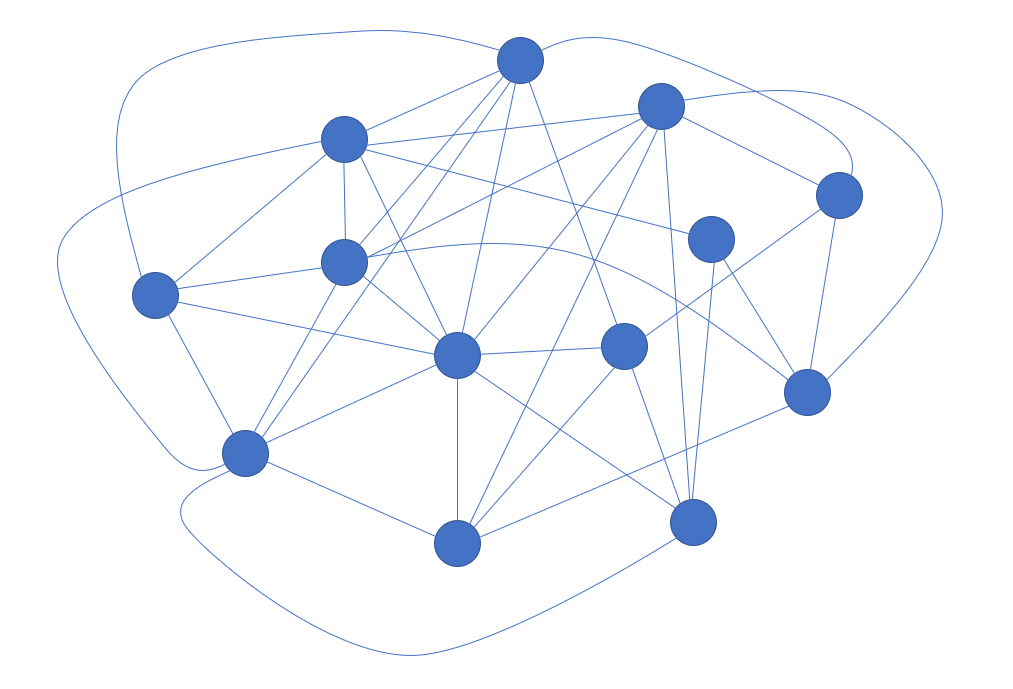
In extractive summarization, the summary of the document is formed by selecting sentences that are considered the most important. There are different ways of considering what makes a sentence important in a document. One of the most common algorithm is the TextRank algorithm, which is what Python gensim uses. In the TextRank algorithm, the sentences in a document is put into a graph representation, where each vertex or node is a sentence in the document, and the edge between the vertices is labelled with the similarity between the sentences. The similarity between the sentences can be measured by any one of the many similarity metrics, such a cosine similarity, onto vector versions of the sentences. Note that the vectors can be formed using either bag-of-word (i.e. one-hot encoding) or word embeddings (i.e. word vectors). The sentences are then ranked by its similarity to all of the sentences, with the sentences that has the highest overall similarity score to all sentences in the document ranked the highest. Finally, the summary is created by selecting the top ranking sentences, with the number of sentences selected via a word count or a proportion of the total number of sentence.
Gensim provides an implementation of TextRank extractive summarisation that is very easy to use. Again, I will be using the CORD19 Data as an example. In this example, the effect of number of word counts in the summary will be investigated:
0from gensim.summarization.summarizer import summarize

#Perform extractive summarization with a range of word counts
for word_count in range(50,350,50):
    summary = summarize(clean_text, word_count = word_count)
    print("No of words: ", word_count)
    print("Summary: ", summary)
    print("\n")
As can be seen, the usage of gensim summarizer is extremely simple. There is not even a need to preprocess the text: clean_text is simply the extracted full text from one of the articles, with undesired labels (that appears on every page of an article and copied as part of the full text) removed. All other preprocessing such as stopwords and stemming are handled by the summarize() function. The code above gives the following result (on one particular article):
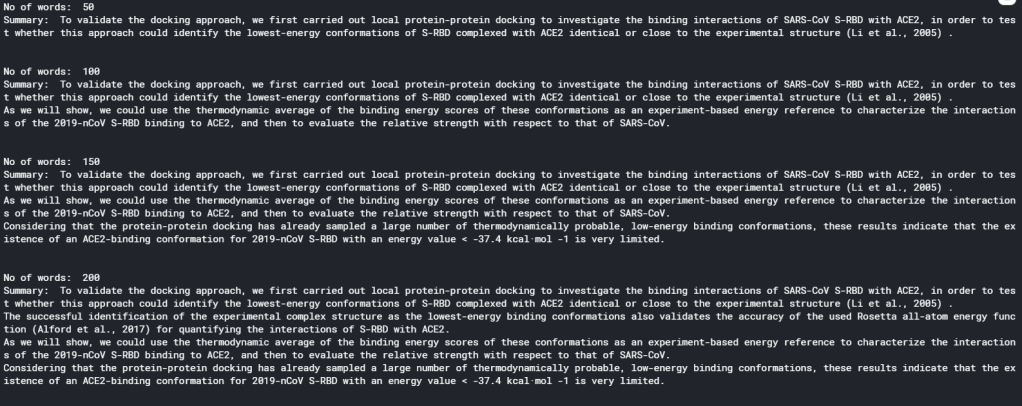
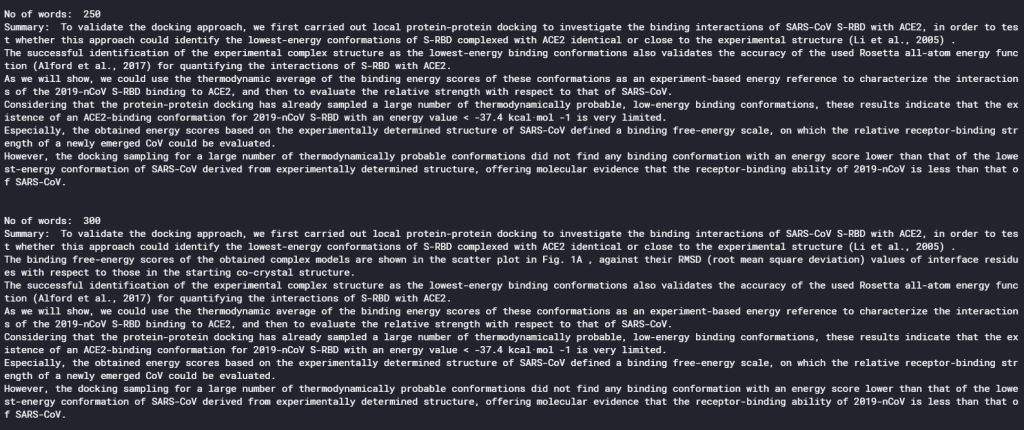
It is clear that there is a sweet spot for summarising an article in terms of the number of words used. With word count less than 100, a summary would only contain 1 or 2 sentences, and therefore is not doing a very good job in summarising an article. On the other hand, if word count is more than 200, the summary becomes too cumbersome to read. Therefore, the optimal number of words seems to be 150 – 200.
Extracting Specific Data
The summary of an article gives an overview of what the article is about, and is therefore very useful for a researcher for screening relevant articles. However, summaries by default would only show general information – information that describes the article in general. Rarely would a summary contain specific results. However, sometimes it may be specific results that a researcher may be after. Additional analysis on top of summarisation would be needed to extract specific results.
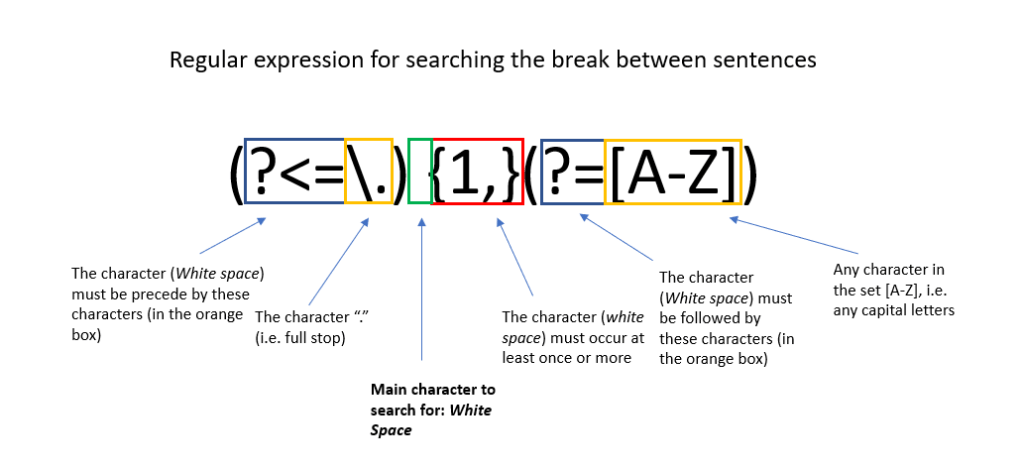
Rather then using complicated algorithms, specific data extraction can be done simply with regular expressions. Regular expressions are expressions that defines a string search pattern that is universal in the field of computer science and linguistics. It uses specific characters to represent certain string patterns. The syntax of regular expressions can be found here. An example of a regular expression is shown below. Python has a regular expression toolbox re, which allows search and substitution of strings that matches the pattern represented by regular expressions. We can therefore make use of regular expression to search out important information in a document.
When thinking about using regular expressions to extract information, one would need to answer the question: what sentence pattern would key results usually appear in. It is noted that in most articles, key results are usually displayed in a table or a figure. Hence looking for sentences that refers to these tables and figures may yield specific results. It is also noted that most scientific results are conveyed by numbers. In particular, numbers followed by units, numbers within a equality or inequality, and non-integer numbers (e.g. decimal places or exponential representations) almost always represent meaningful results. That is because scientific measurements is most likely to be non-integer, and presented with a unit or in a equality or inequality for statistical analysis. We can therefore make use of the two rules above to extract information from the full text of the article, using regular expressions:
import string
from nltk.tokenize import word_tokenize

#This code check if a token is a number, and seperate between integer and float
def check_token(token):
    try:
        num = int(str(token))
        return "integer"
    except (ValueError, TypeError):
        try:
            num = float(str(token))
            return "float"
        except (ValueError, TypeError):
            return "string"


def extract_key_sentences(clean_text):
    #Break the text up into sentences
    sentences = re.split(r"(?<=\.) {1,}(?=[A-Z])", clean_text)


    #Empty list to store key sentences and words
    key_sentences = []
    fig_sentences = []
    special_words = []

    #Specify special tokens to look for: common units, comparasion operators, and tokens related
    to figures and tables
    units = ["kcal", "K", "ml", "mL", "L", "J", "kJ", "mol", "eV"]
    ops = [">", "<", "=", ">=", "<=", "≤"]
    fig_list = ["Figure", "FIGURE", "Fig", "figure", "fig", "figures", "Table", "table", "TABLE", "Graph", "graph"]

    #For each sentence in the full text, check for tokens, and either score according to the number detected in the sentence, select the sentence if it is referring to figure/table/graph,
    #or flag as a special term if it contains both letter and numbers

    for s in sentences:
        #First tokenise to seperate into individual tokens
        tokens = word_tokenize(s)
        score = 0
        selected = 0
        for i in range(len(tokens)):
            #check token - int, float or string
            word_type = check_token(tokens[i])

            #for integers, only consider numbers that are not years
            #And for other integers, only contribute to score if it is followed by a percent, a unit, or followed or precede by one of the comparison operators
            if word_type == "integer":
                if (int(str(tokens[i])) < 1800) or (int(str(tokens[i])) > 2030):
                    if (i > 0) and (i < len(tokens) - 1):
                        if ((str(tokens[i+1])) == "%") or (str(tokens[i+1]) in units) or (str(tokens[i-1]) in ops) or (str(tokens[i+1]) in ops):
                            score = score + 1
            #All floats are consider important and are scored higher
            if word_type == "float":
                score = score + 3
            #for strings,check if it is a "figure sentence"
            if word_type == "string":
                if (str(tokens[i]) in fig_list):
                    selected = 1

        #Save sentence if they fit criteria
        if score > 0:
            key_sentences.append((s, score))
        if selected > 0:
            fig_sentences.append(s)

    #Store empty string if no key sentences are detected
    if len(key_sentences) == 0:
        key_sentences.append(("",0))

    #Sort by score before returning it
    key_sentences.sort(key=lambda x:x[1], reverse = True)

    return key_sentences, fig_sentences

key_sentences, fig_sentences = extract_key_sentences(clean_text)


#Print the top five key sentences
print("Key results extracted:\n")
for i in range(5):
    print(key_sentences[i][0]+"\n")
This piece of code probably warrant some explanation. The function extract_key_sentences() aims to extract out sentences that contains the words “figure” or “table” (or their abbreviations), as well as sentences that contains key results. This is done by first tokenising each sentences (using nltk), and classifying each token as a int, float or a string. Each float detected in the sentence gives a score of 3 to the sentence, since floats are considered to contain the most specific information. Each int detected that is not a year, and that it is followed by a unit, a percentage sign, or have a equal sign or inequality sign before or after it, are considered to be useful as well, and assigned a score of 1. Any sentence with a score greater than zero is selected as a key result sentence. For each string detected, we look at whether the string is “figure” or “table” or a variation on either. If it is, the sentence is automatically selected as a figure sentence.
Running the code yields the following key sentences (on an arbitrary article):
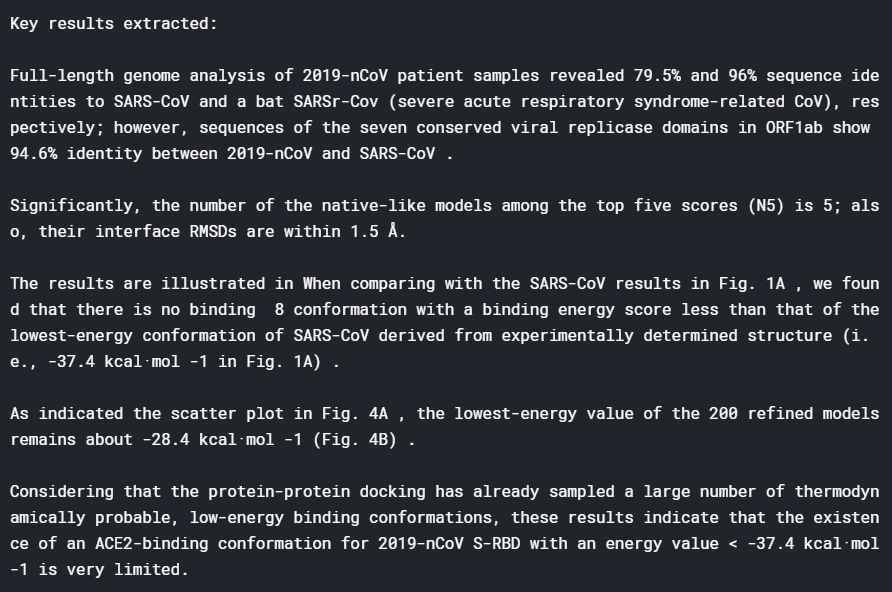
It can be seen that this technique works very well. We are able to extract from the article specific results about the binding energy of different proteins, which are results that a researcher would look for when reading this paper. The result above indicates that regular expression extracting sentences with specific numerical results does yield useful information.
The following shows some of the figure sentences:
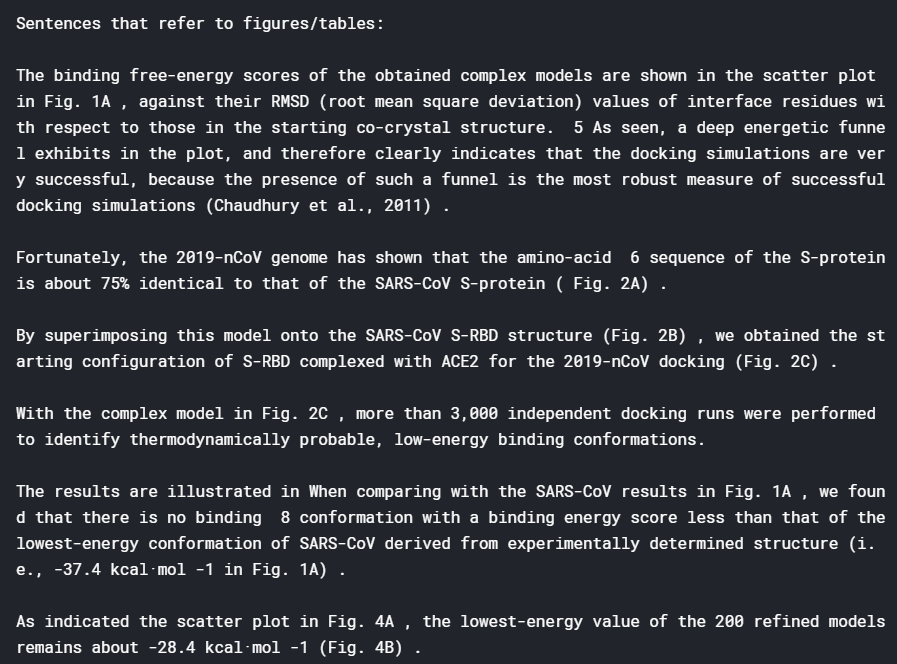
Sentences referring to figures seems to provide less information. This is probably due to the fact that when taking about a figure, the first sentence that mentions the figure may not be the sentence that actually describe the specifics in a figure. Nevertheless, these sentences reveal what figures are present in the article, another piece of information that is useful to have.
Putting all these together, a search function can be made to search for particular keywords in the full text, summary, or within the key results or figure sentences (after the summary, key sentences and figure sentences are extracted and stored in the dataframe) :
def find_information(keyword_list, options = "Summary", num_sentences = 5):
    df_temp = []
    if options == "Summary":
        df_temp =  df_cluster[df_cluster['summary'].apply(lambda x: all(substring in x for substring in keyword_list)) == True]
    elif options == "Full text":
        df_temp =  df_cluster[df_cluster['text'].apply(lambda x: all(substring in x for substring in keyword_list)) == True]
    elif options == "Figures":
        df_temp =  df_cluster[df_cluster['figures'].apply(lambda x: all(substring in x for substring in keyword_list)) == True]
    elif options == "Results":
        df_temp =  df_cluster[df_cluster['results'].apply(lambda x: all(substring in x for substring in keyword_list)) == True]

    if (len(df_temp) == 0):
        print("The Search Cannot find any relevant articles")
    else:
        print("Number of Articles Found: " + str(len(df_temp)) + "\n")

        for i in range(len(df_temp)):
            print("Title: ", df_temp['title'].iloc[i], '\n')
            print("Authors: ", ",".join(df_temp['authors'].iloc[i]), '\n')
            print("Summary: ", df_temp['summary'].iloc[i], '\n')
            print("Key Results: \n")
            for j in range(len(df_temp['results'].iloc[i])):
                if j < num_sentences:
                    print(df_temp['results'].iloc[i][j]+"\n")
            print("Sentences that refer to figures/tables:\n")
            for j in range(len(df_temp['figures'].iloc[i])):
                if j < num_sentences:
                    print(df_temp['figures'].iloc[i][j]+"\n")


    return df_temp
which yields the following for a search for article with summaries that contain keywords “vaccine” and “SARS” (Only the first article is displayed here):
df_answer = find_information(["vaccine", "SARS"])
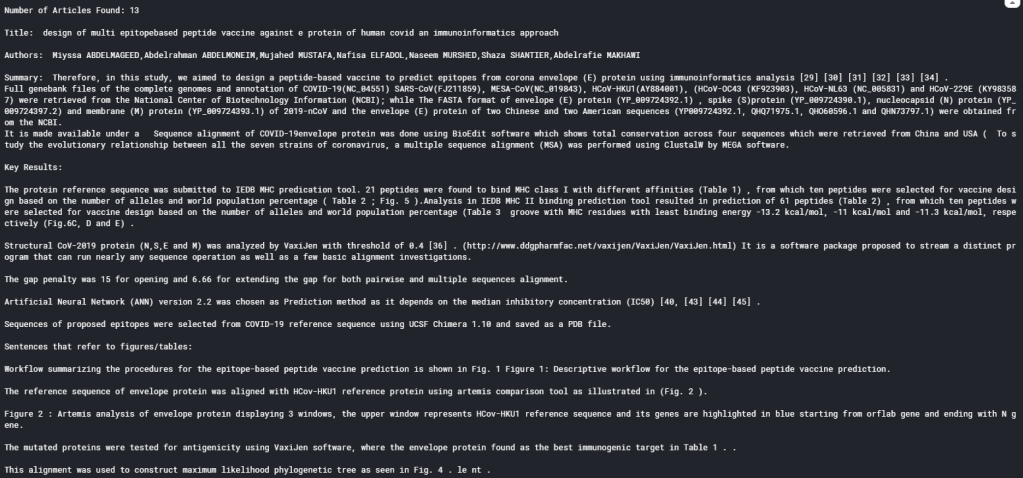
As can be seen, the search function displays the title, author, summary, key results and figure sentences extracted for all the articles that fits the search, allowing researchers to quickly glance for results that are truly useful, and determine which article warrants an in-depth read.
Summary
In summary, over the last 4 blogs, I have demonstrated how NLP can be used as a tool to speed up literature review, using the CORD19 challenge as an example. By applying topic modelling and word vector clustering, relevant articles can be selected. Selected articles can then further analysed using extractive summarisation and regular expressions. Obviously there are a lot of other techniques that can be applied to further improve the analyses these articles to yield even better results. But hopefully these blog at least illustrates the basics and shows how powerful NLP can be for analysing a database of unknown articles.
References
Tutorial and explanation on TextRank Algorithm
Official Gensim tutorial on Summarization
Wikipedia Page on Regular Expression
Regular Expression Syntax guide
The Full code on the material in this blog can be find in my Kaggle Notebook
 William's Blog